Showing posts with label basic instruction. Show all posts

Basic Instruction Glofa ladder diagram programming tutorial part II : Up Counter (CTU)

Dear all hands,

It’s the third my posting about glofa ladder programming tutorial. So you can see this post as successor of my second post about glofa programming tutorial.In this post I want to talk about CTU or up cainter basic instruction. Basically CTU is incremental counter.

Ladder symbol for CTU (UpCounter).


Explanantion :

CU : Up counter pulse input, : triggering input for start increment counting,

R : Reset input, when its value is , CV value will reset back to zero..

PV : Preset Value,: counter maximum setting value, type data integer with value range between :-32768 – 32768

Q : Up counter output, counter output that will be executed if CV value reach PV value.

CV : Current Value, recent counter value being displayed.

Ladder diagram example for CTU :

In glofa ladder diagram above, Counter PV value is 10, when “%Q0.0.0” on, then counter will start count from 0 to 10, when CV reach its max value (10), then output counter (OUT1) will on, its make output “%Q0.0.0” also on and PV value will reset back . If. Jika input “%I0.0.1” (reset input) on, then i current value (CV) will also back to zero.

Glofa ladder diagram programming basic instruction PART 1

Dear all hands

After we understanding the basic concept of glofa ladder diagram pogramming , we now can start with glofa ladder diagram programming basic instruction, for increase speed our learning process of glofa programming we can summary the most often used basic instruction.

Counter Function :

CTD or Counter down

Ladder symbol for CTD :


Explanation :

CD : Down counter pulse input, input trigger for starting counter. When CTD is ON , CTD will count in decrement counting.

LD : Loads preset value,: If LD has value 1 , CV value will be restored as PV value.

PV : Preset Value: is a maximum setting value of the counter. Its range between :-32768 – 32768 , with integer data type.

Q : Down counter output,: counter output that will be executed if the counter reach 0 or negative value..

CV : Current Value, : is the value being displayed when counter incounting condition.

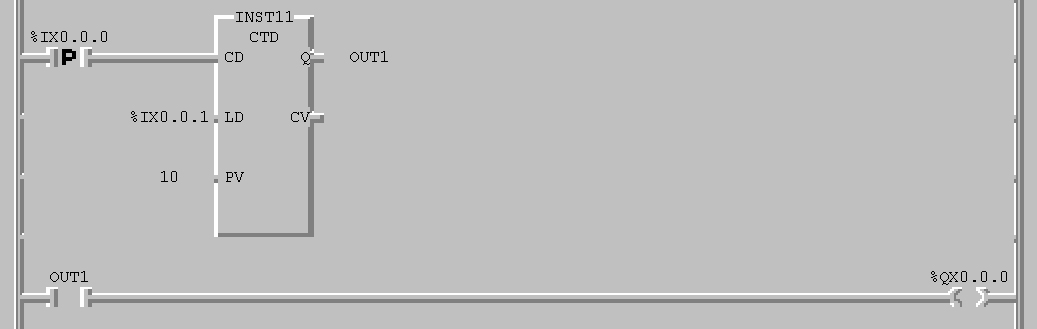
Figure below depicted an example ladder diagram programming use CTD , counter basic instruction


Ladder diagram program above ,maximum value is 1, when input “%Q0.0.0” , then counter will count decremently fro 10 to , so that CV value reach zero or negative value then output counter (OUT1) will on, and output “%Q0.0.0” also on. If input “%I0.0.1” on, the current value (CV) will back to Preset Value (PV) in this chase is 10.